










Your Media.
Organized. Edited. Private.
A complete photo and video library with powerful editing, built to run entirely on your hardware.No cloud. No subscription.
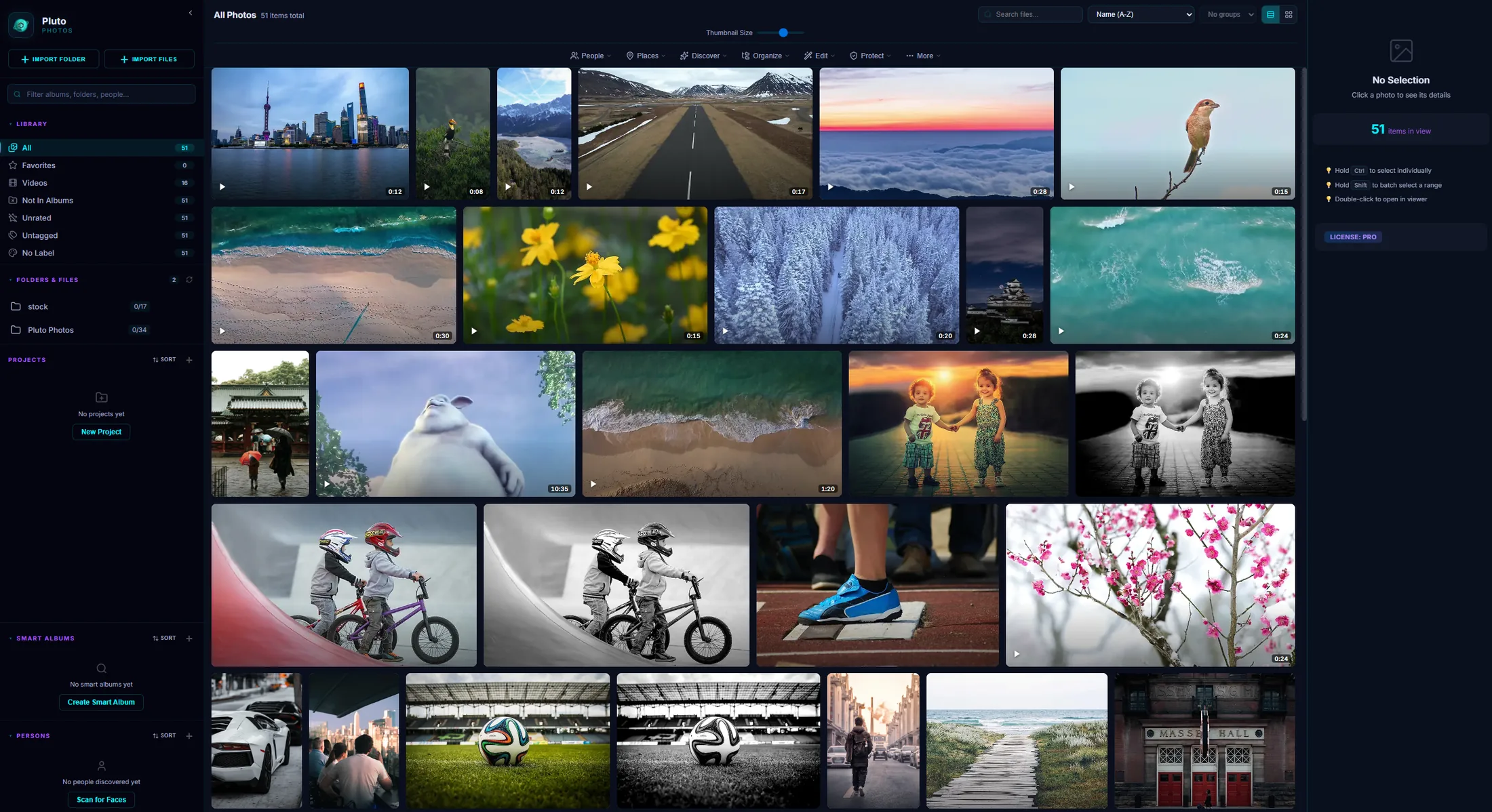
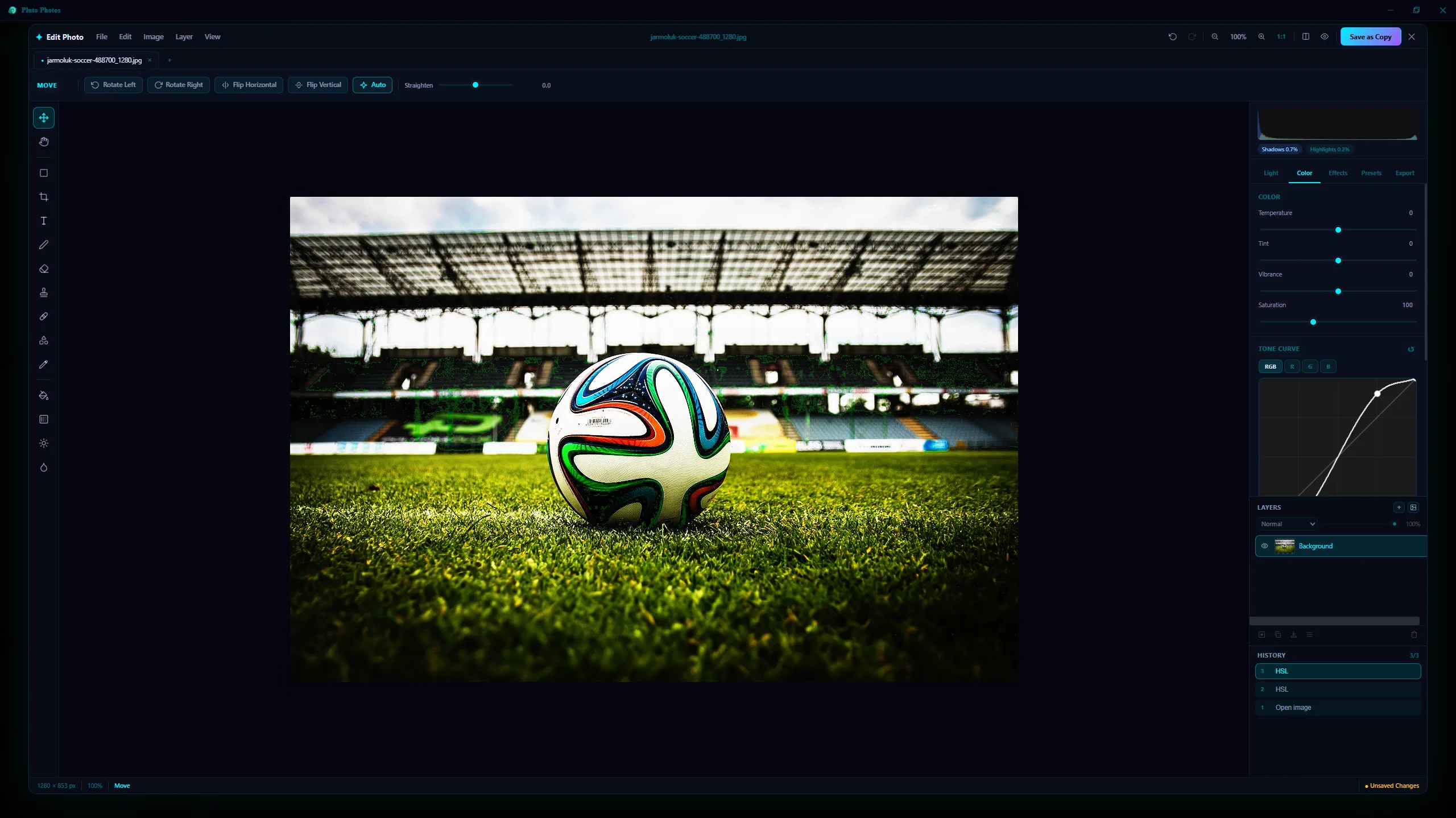
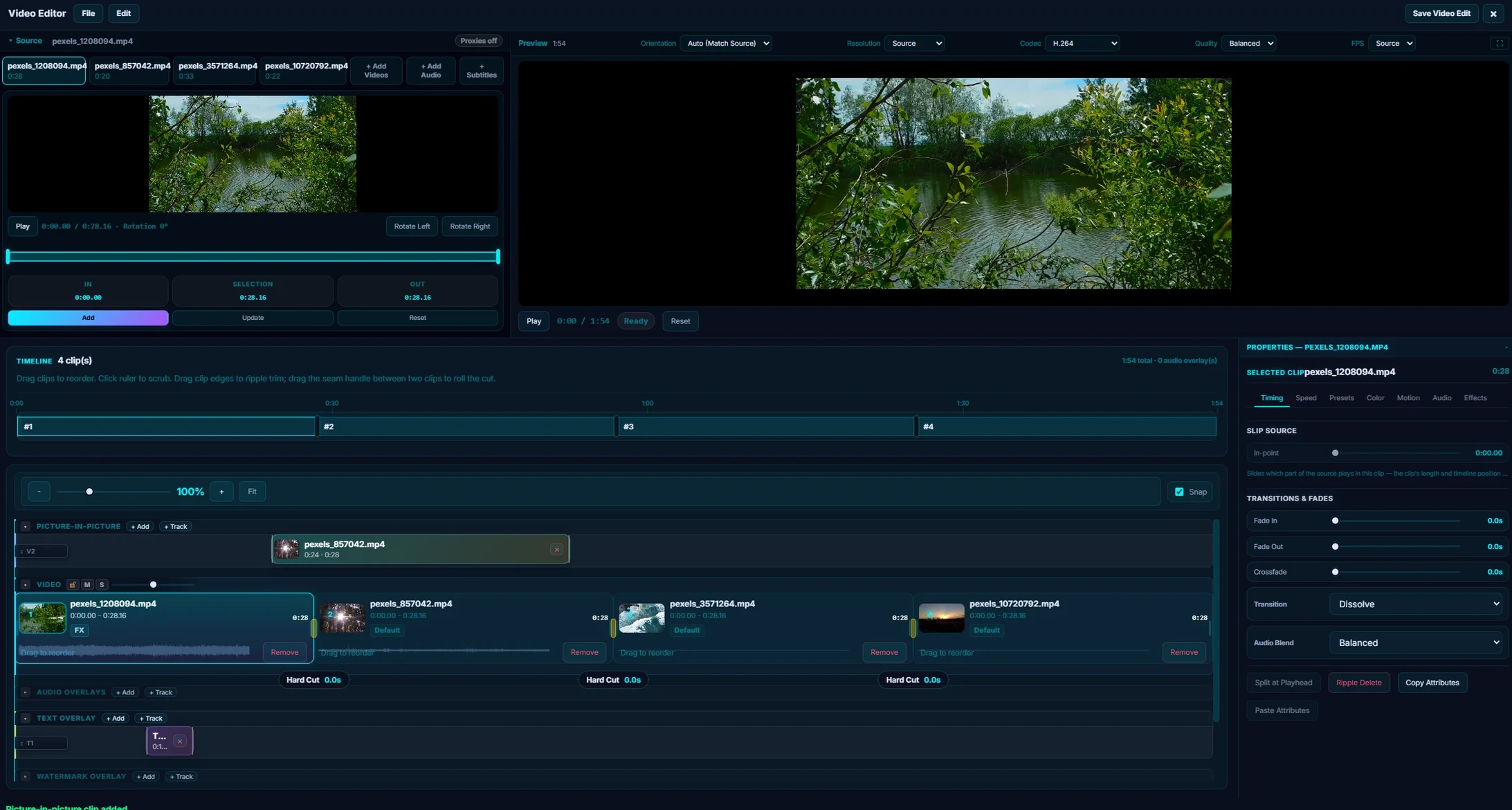
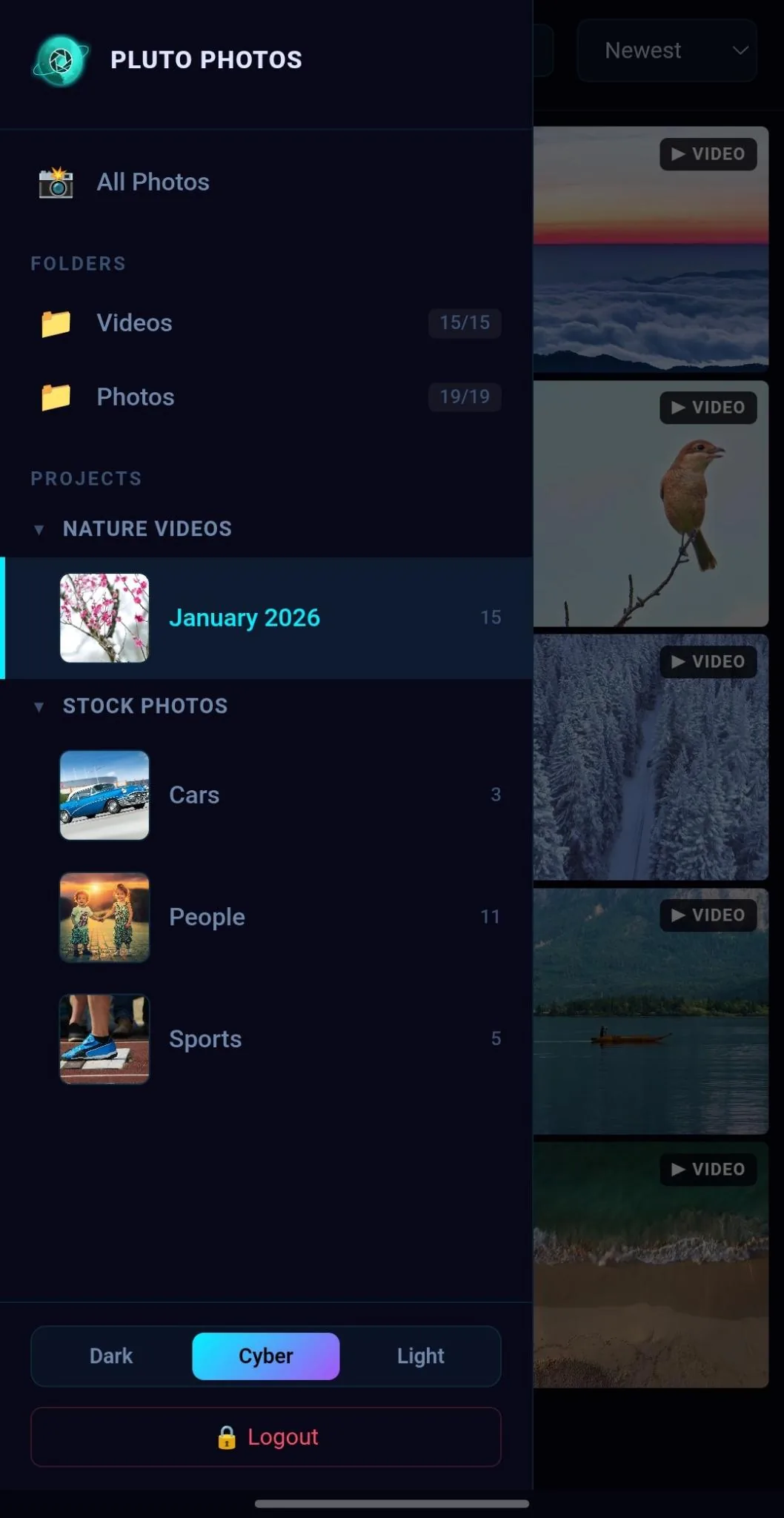
Image Editor
Pro-Grade Photo Editing.
No Extra App Needed.
57 filters, layers, masks, and pro retouching tools. Tone curves, HSL, portrait blur, one-click background removal, and batch LUT grading — a complete editing suite built into your library.
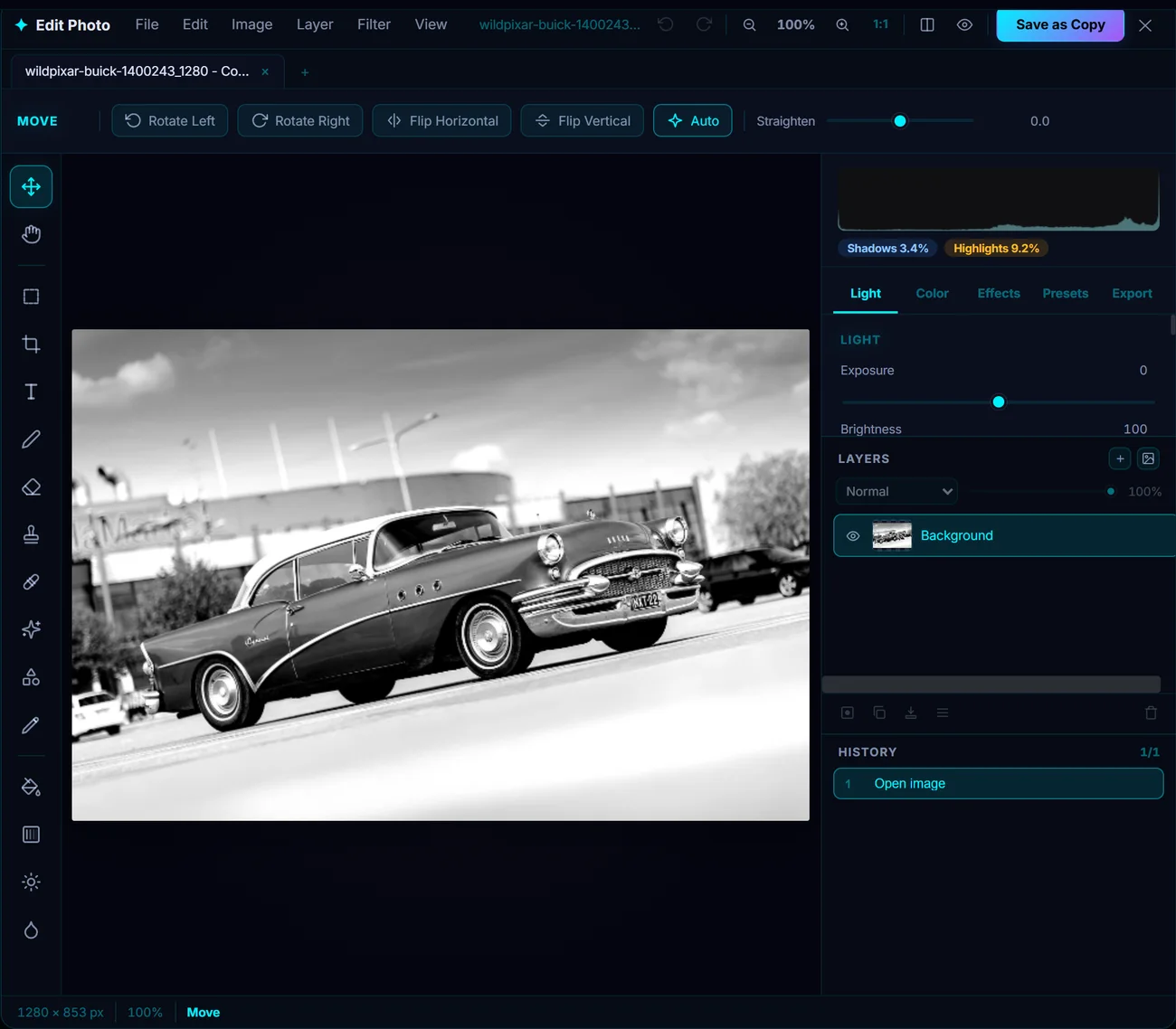
A real layers panel: stack images and text, paint on empty layers, and control everything with masks, opacity, and blend modes. Edit multiple photos at once in document tabs.
57 Filters
Blur, sharpen, distort and stylize, plus lens bokeh, tilt-shift, film grain, skin smoothing, bloom and light leaks. Live preview, blend modes, and any of them can be confined to a selection.
Layers, Masks & Blend Modes
A real layers panel: stack images and text, paint on empty layers, and control everything with masks, opacity, and blend modes. Edit multiple photos at once in document tabs.
Retouch Toolkit
Clone stamp, spot heal, dodge & burn, blur brush, shapes, gradients, and a magnetic lasso that snaps to edges — everything you need to clean up a shot.
Batch LUT Grading
Apply any .cube LUT to hundreds of photos at once with adjustable intensity, then save as copies or overwrite in place. Your signature look, applied everywhere.
Tone Curves & HSL
Multi-channel tone curve editor (RGB, R, G, B) and 8-band HSL color tuning. The same tools professionals use in Lightroom and Capture One.
Portrait Blur
AI detects the subject and blurs the background automatically. Four presets — Soft, Natural, Studio, Dramatic — plus manual sliders for full control.
Background Removal
One-click background removal powered by on-device AI. Export as transparent PNG for compositing — no internet, no watermarks.
Privacy — Safe Share
Detect faces on-device and blur or pixelate them before sharing. Nothing is uploaded, and every export is already stripped of EXIF and GPS data.
12 Color Presets
HDR, B&W, Cinematic, Matte, Vivid, Dramatic, Portrait, Golden, Velvia, Noir, Cool, and Vintage — each with an intensity slider.
Auto Enhance
One button analyzes your photo's histogram and applies intelligent exposure, color, and contrast corrections. Bad photos become acceptable in one click.
Non-Destructive Export
Save as PNG, JPEG, or WebP with quality and resize controls. Before/after comparison at any time. Your original file is never modified.
Video Editor
A Full Video Editor.
Built Right In.
Trim, combine, and polish your clips without ever leaving Pluto Photos. Multi-track storyboard editing, cinematic effects, LUT color grading, green screen, text & image watermarks, audio overlays, and source-quality export — all powered by FFmpeg under the hood.
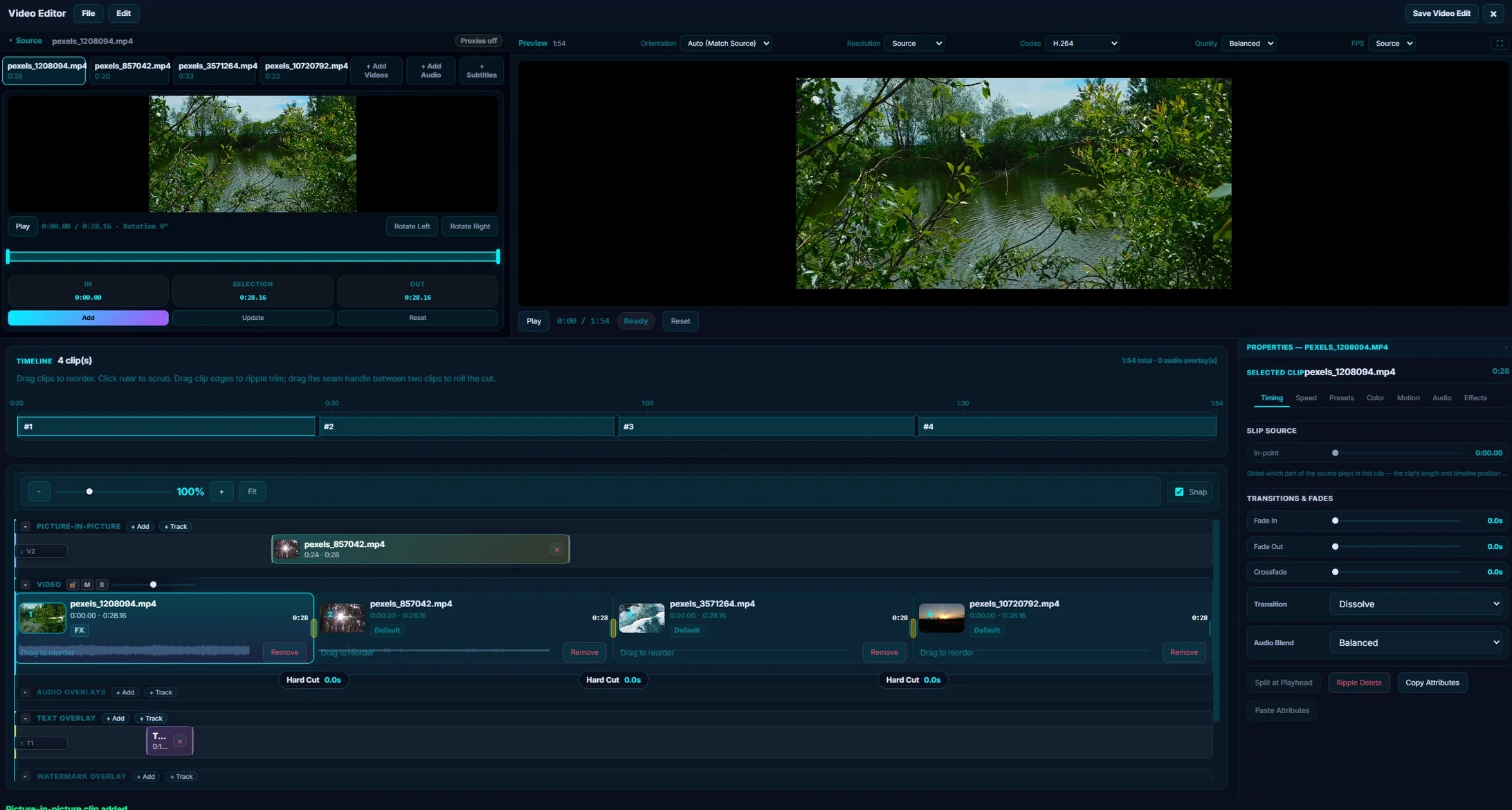
Multi-Clip Storyboard
Drag clips onto a visual timeline, reorder with drag-and-drop, and split at the playhead. Build complete edits from multiple source videos.
Cinematic Effects & LUTs
Letterbox bars, vignette, film grain, blur, and green screen. Six built-in LUTs plus custom .cube import. One-click presets like Trailer Look and Retro Film.
Text & Image Watermarks
Overlay text or image watermarks on your exported video. Control position, size, opacity, and timing — brand your content or add subtitles without a separate tool.
Audio Overlays
Layer multiple music tracks, narration, or sound effects on the timeline. Trim, reposition, and crossfade with clip audio. Full volume and timing control per track.
Repair Presets
One-click fixes — Clean Dialogue, Low Light Rescue, Mobile Cleanup. Stabilization, jello repair, and denoise built in. Fix common problems instantly.
Export at Source Quality
Render your final video at full source resolution with a real-time progress bar. No watermarks on output, no quality loss — your footage, your files.
The Organizer
Not Just an Editor.
A Library That Runs Itself.
Smart albums file themselves, AI finds every face and pet, duplicates get flagged automatically, and you can search your whole library the way you'd describe a photo to a friend.
 Pro
ProSearch By Describing the Photo
Type "dog on a beach" or "birthday cake" and Pluto finds it — powered by on-device AI that actually looks at what's in the frame, not just filenames and tags.
Learn more → Faces
Faces Pets
PetsFind Every Face — and Every Pet
AI groups everyone in your library automatically, pets included. Name someone once, and every past and future photo of them is found instantly — 100% on-device.
Learn more →Smart Albums
Rule-based albums that file themselves by date, camera, rating, tag, or GPS radius — and stay current as you import.
Duplicate Finder
Perceptual hashing catches re-encoded copies and resized duplicates, not just matching filenames.
Batch Operations & LUTs
Rate, tag, label and export a whole selection in one pass — or grade hundreds of photos with a single .cube LUT.
Tags, Ratings & Color Labels
Build your own organizational system — free on every tier, and searchable everywhere.
Browse From Any Device
Your library,
on every screen.
Pluto Photos runs a private server on your computer. Any device on your home network — TV, tablet, phone, or laptop — can open your full library in a browser or launch a slideshow. No cloud. No accounts. No waiting.
Living room slideshow
Turn any TV into a living photo frame. Open Pluto in your smart TV's browser, pick a date range or album, and let your memories fill the screen — no Chromecast hub, no Apple TV, no subscription.
"Our TV now cycles through every family vacation automatically. Guests always ask how we did it."
Browse from the couch
Pull up any photo from your entire library on your phone or tablet — without touching the computer. Search by face, date, or location. Share instantly. The full Pluto experience, on the screen you're already holding.
"I can search 'beach vacation 2019' from my phone and find every photo in seconds. It's incredible."
Business lobby display
Photographers, studios, and event venues can display portfolio shots or event galleries on any lobby screen — served directly from their local machine. Clients see the latest work the moment it's imported.
"Clients walk into our studio and see their session playing on the wall. Every single time it lands."
Map View
See Where Every Photo,
Was Taken.
Photos with GPS data are plotted on an interactive map and grouped by location. Click a place to browse its photos, then click any photo to view it full-size — perfect for reliving trips.
Why Buy Pluto Photos?
Stop Renting Your Tools.
Own Them.
Photographers and creators cobble together monthly subscriptions for each tool they need. Pluto Photos replaces them all with a single one-time purchase.
Individual subscriptions
And you lose access the moment you stop paying.
Pluto Photos Pro
- ✓ Pro photo editor with layers & masks
- ✓ 57 filters & batch LUT grading
- ✓ Multi-clip video editor
- ✓ Audio overlays, watermarks & face blur
- ✓ AI object removal
- ✓ Unlimited background removal
- ✓ AI face detection & photo search
- ✓ Smart albums, duplicates & AI culling
- ✓ Map view & automatic Trips
- ✓ Folder replication & scheduled backups
- ✓ Encrypted vault & Safe Share
- ✓ AI upscaling, blur & auto-enhance
- ✓ Web & mobile companion
- ✓ 100% local — your data stays yours
No subscription. No recurring charges. Free updates forever.
No Internet Required
Every AI feature runs on your machine. Background removal, face detection, and contextual search all work local. Cloud services can't say that.
No Per-Image Fees
Services like remove.bg charge per image or cap free credits. Pluto Photos has no limits — process 10 photos or 10,000, same price: $0 after purchase.
Privacy by Default
Cloud AI services upload your photos to remote servers. Pluto Photos processes everything locally — your images never leave your machine.
Free Trial
Try Pro Free for 30 Days
Unlock every Pro feature — smart albums, AI face detection, map view, duplicate finder, and more. No credit card required.
Desktop Application
Get Pluto Photos
Available for Windows, macOS, and Linux. Start with the free tier — upgrade whenever you're ready.
Mobile Companion
Get Pluto Companion
Back up and browse your photos from your phone. Pairs with your desktop library over LAN.
The Pluto Companion app is in final testing. The Google Play listing goes live shortly — the desktop app is available now.
More install options — Docker, Arch Linux
Self-Hosted Photo Server (Docker)
Host your own private photo library on a NAS, Raspberry Pi, or home server — browse and manage your entire collection from any device's web browser.
- 100% private— your photos never leave your network. No cloud uploads, no third-party access.
- Access anywhere— browse your full library from any phone, tablet, or computer on your local network.
- AI-powered face detection— fully local face recognition groups photos by person automatically.
- Runs on anything— works on Synology, QNAP, Unraid, TrueNAS, Raspberry Pi, or any Linux server with Docker.
example.env → .env, set your photo path + passworddocker compose up -dNative Arch Linux package via the AUR. Installs as a system application with automatic updates through your AUR helper — no Flatpak, Snap, or AppImage needed. View on AUR →
yay -S pluto-photos-binPricing
One Payment. Yours Forever.
Desktop plans are one-time purchases — no subscription required. The Mobile Companion app is free to browse; smart features are a separate monthly add-on.
Free
Get started with the essentials. No credit card required.
- ✓ Up to 500 photos, 1 library
- ✓ Tags, ratings & albums
- ✓ Export photos
- ✗ No editor, AI tools, or batch ops
Pro
The complete suite — every feature, forever.
- ✓ Unlimited libraries & photos
- ✓ Full photo & video editor
- ✓ AI face detection & smart albums
- ✓ AI contextual search & map view
- ✓ Duplicate finder & batch ops
- ✓ Cloud import & background removal
- ✓ 2 devices, lifetime updates
Mobile Companion
Free to browse your library from your phone. $5/mo unlocks backup & smart tools.
- ✓ Browse your full library — free forever
- $5/mo unlocks
- ✓ Automatic Wi-Fi backup
- ✓ Duplicate cleanup tools
- ✓ Password-protected vault
- ✓ Remote access, fully encrypted
Requires Pluto Photos desktop (free or Pro)
FAQ
Frequently Asked Questions
Is Pluto Photos free?
Yes! Pluto Photos offers a free tier with support for up to 500 photos, tags, ratings, albums, and export. Pro ($29 one-time) unlocks unlimited photos, AI face detection, smart albums, map view, the video editor, and more.
Does Pluto Photos require an internet connection?
Only to license the product. Pluto Photos is 100% local-first. All features including AI face detection run locally on your machine. No cloud required, no subscription needed.
What platforms does Pluto Photos support?
Pluto Photos is available for Windows 10+ (64-bit), macOS 11+ (Apple Silicon), Linux (AppImage), and Arch Linux (AUR). There's also a self-hosted Docker server you can run on any NAS, Raspberry Pi, or home server.
Is this a subscription?
No. Pluto Photos is a one-time purchase. Buy once and own it forever, including free lifetime updates.
How many devices can I use it on?
Each license allows activation on up to 2 devices. You can deactivate a device at any time to free up a slot.
Can I import from Google Photos?
Yes! The Pro tier includes cloud import that lets you import your Google Photos Takeout data directly. It also supports importing from iCloud exports.
What is your refund policy?
All purchases of Pluto Photos are non-refundable. We strongly encourage you to try the Free 30-day Pro Trial before purchasing to make sure the software meets your needs. If you encounter a special circumstance, please email support@plutophotos.com with a description of your issue and our team will do their best to assist you.
Is Pluto Photos a good Google Photos alternative?
Yes. Pluto Photos is designed as a privacy-focused Google Photos alternative. You can import your Google Photos Takeout data directly, and all AI features like face detection run locally on your machine. Unlike Google Photos, there are no monthly fees — just a one-time purchase.
Can I use Pluto Photos as a media library manager?
Absolutely. Pluto Photos works as a full media library manager supporting photos and videos. Organize your entire collection with smart albums, tags, ratings, color labels, and folders. It's designed to manage large libraries with 10,000+ files efficiently.
Can I edit videos in Pluto Photos?
Yes! The Pro tier includes a built-in multi-track video editor. Trim clips, combine multiple videos on a timeline, add audio overlays, apply transitions, and export with presets — all processed locally on your machine.
How do I organize and manage my photos with Pluto Photos?
Point Pluto Photos at any folder on your computer and it automatically imports and organizes everything. Use AI face detection to group by person, smart albums to auto-sort by date or camera, tags and ratings to categorize, and the map view to browse by location. It's the easiest way to manage your photos locally without cloud storage.
What is the Mobile Companion and does it require a subscription?
The Pluto Companion app (Android first, iOS to follow) is coming soon. It will let you browse your full library for free — no subscription required. A $5/month subscription unlocks automatic Wi-Fi backup, remote access away from home, a password-protected vault, and duplicate cleanup tools. It requires the Pluto Photos desktop app (free or Pro).
Can I access my Pluto library when I'm away from home Wi-Fi?
Yes. The Mobile Companion automatically falls back to your public IP when home Wi-Fi is unavailable. All remote connections use HTTPS with certificate pinning, so your photos travel encrypted end-to-end with no cloud relay in between. No VPN required.
What is the vault feature in the Mobile Companion app?
The vault lets you move sensitive photos out of your regular library and lock them behind biometrics (Face ID, fingerprint) or a PIN. Vault contents are completely hidden from the main photo view and cannot be accessed without authentication — not even by someone who has your unlocked phone.
Can I view my photos offline with the Mobile Companion?
Yes. You can cache selected albums to your phone and browse them without any Wi-Fi or internet connection — useful on flights, in remote areas, or anywhere you're away from your library. Cached photos are stored at full quality and can be shared directly from your phone.
How secure is the Mobile Companion's remote connection?
All connections use TLS 1.3 (HTTPS). On first pairing, your phone receives a cryptographic fingerprint of your desktop's self-signed certificate via QR code. From that point on, your phone verifies that fingerprint on every connection — a technique called certificate pinning — which means even a network attacker cannot impersonate your server. Your photos never pass through any third-party relay.
Do I need to re-scan the QR code if my home IP address changes?
No. When connected via home Wi-Fi, the Companion app silently reads your server's current public IP and updates it automatically. Your remote access stays working even when your ISP changes your IP — no re-pairing needed.
Still have questions? Contact us →

Ready to take control of your photos?
No subscriptions. No cloud uploads. No compromises.
Organize photos, edit videos, and manage your entire library — all local.